A cross-platform, Java-based screen recording tool is available that
enables you to record your screen, which you can then send to IBM Support with
any other data that might be requested. This tool will allow you to record your
screen while recreating a problem locally or to share a set of steps with IBM
Support.
How To Record Your Screen
Notes before
you begin:
The java-screen-recorder tool requires a Java™ Runtime
Environment (JRE) installed on the system that you wish to record
Only the primary monitor will be recorded if you are using multiple monitors
The tool does not capture audio during the recording
Complete the following steps to download the tool and record your
screen:
Today is an exciting day because it marks the first time that IBM is making Watson technology available to any developer around the world.
What is Watson?
Watson is a computer that is not based on rules that govern traditional systems. Traditional computers are programmatic systems built upon rules like X + Y = Z. These systems require all inputs and outputs to be accounted for in the system. Otherwise, the system will break.
These systems handle structured data like tables well, but struggle in unstructured spaces like language. This makes it complicated, expensive, and/or impossible to build certain types of applications. For example, think about a machine built to assist doctors in diagnosing disease. The presence of a symptom is important, but the lack of symptoms can be just as or even more important.
Programming a computer to not only understand the symptoms, but the lack of symptoms becomes exponentially complex.
Watson is a computer that is not based on rules that govern traditional systems. Traditional computers are programmatic systems built upon rules like X + Y = Z.
Watson is different and a complement to programmatic machines. It is a learning system designed to consume information and learn subjects (aka domains) like a human. It answers queries based on hypothesis and a degree of confidence. Over time, we can improve and expand Watson’s skills to improve those hypotheses.
The first instantiation of Watson that the public saw was in 2011 on the TV show Jeopardy. The Watson computer consumed Wikipedia, medical journals, previous Jeopardy questions and answers among other information. 200 million pages were consumed, learned, and accessible by the machine during the show which beat two grand champions, Ken Jennings and Brad Rutter.
While Jeopardy was an accomplishment by itself, more importantly it provided an important piece of evidence that a system can interact with humans in their own language, language that includes the complexity and nuance of puns and colloquialisms.
Watson Services for Bluemix
In 2012, the Watson group partnered with MD Anderson to adapt the Watson machine to help in fight cancer. In 2013, IBM adapted the machine to help customer service centers better interact with their customers. In 2014, IBM is releasing a number of cognitive based technologies built on the Watson foundation.
This is not just a Q&A system anymore. IBM has exposed underlying technologies, created new ones, and improved on the ones that people have been hearing about for several years. The value to developers is that they don’t need to be a Data Scientist or have a machine learning background to get started with the services. Watson service are exposed as Rest APIs.
This is not just a Q&A system anymore. IBM has exposed underlying technologies, created new ones, and improved on the ones that people have been hearing about for several years.
The new services available through Bluemix and include:
User Modeling; Uses linguistic analytics to extract a set of personality and social traits from the way a person communicates. The service can analyze any communication the user makes available such as their text messages, tweets, posts, email, and more. Users of the service can understand, connect, and communicate with people on a more personally tailored level by analyzing personality and social traits.
Machine Translation: Converts text input in one language into a destination language for the end user. Translation is available among English, Brazilian Portuguese, Spanish and French.
Language Identification: detects the language in which text is written. This helps inform next steps such as translation, voice to text, or direct analysis. Today, the service can identify 15 languages.
Concept Expansion: Analyses text and interprets its meaning based on usage in other similar contexts. For example, it could interpret “The Big Apple” as meaning “New York City.” It can be used to create a dictionary of related words and concepts so that euphemisms, colloquialisms, or otherwise unclear phrases can be better understood and analyzed.
Message Resonance: Analyzes draft content and scores how well it is likely to be received by a specific target audience. Today, analysis can be done against people active in cloud computing or big data discussions but future versions will let users provide their own community data.
Relationship Extraction: Parses sentences into their various components and detects relationships between the components. The service maps the relationships between the components so that users or analytics engines can more easily understand the meaning of individual sentences and documents.
Question & Answer: Interprets and answers user questions directly based on primary data sources that have been selected and gathered into a body of data or “corpus.” The service returns candidate responses with associated confidence levels and links to supporting evidence. The current data corpora on Bluemix focus on the Travel and Healthcare industries.
Visualization Rendering: Takes input data and graphically renders it as an interactive visualization which can range from a common business chart to more advanced layouts. The visualizations can be easily modified to match user needs, visual styling, and types of data being analyzed.
Why Bluemix
Bluemix is IBM’s cloud development platform and is designed for developers to quickly build, run, scale and manage applications. IBM is committed to open technology in cloud and for that reason Bluemix is built on the Cloud Foundry open source project.
Applications typically rely on a variety of underlying technologies that developers then build on top of and with the introduction of Watson services, we have now added more than 60 IBM, 3rd party and open source services to Bluemix since we introduced the platform in late February of this year.
As such, developers not only have access to Watson services through Bluemix, but databases, runtimes and services for web, mobile, devops, analytics and internet of things.
How clients are using Watson Services today
At the Digital NYC launch last week we were thrilled to be joined by one of our clients, eyeQ Insights. eyeQ specializes in personalized experiences in in-store shopping and their application uses the user modeling service.
A shopper in a bike store simply enters their Twitter ID into a 42 inch in-store touchscreen. Then, the entire display, such as the looping video feed, changes itself based on the identified characteristics of the shopper.
Check out our sample apps
In addition, we’ve built a number of sample applications for the new Watson services and have embedded the user modeling sample app below. It comes populated with text from Moby Dick, and if you click “analyze” you can see the type of results Watson can return in terms of both the data and analysis as well as a visualization based on the new visualization rendering SDK.
We have also published a more complete portfolio of sample applications that you can access on our Watson Developer Cloud page.
We can’t wait to see what you build
We believe that this is another step forward in applications that radically change the way businesses provide services and reduce the barriers of communication to their consumers across industries, domains, and disciplines.
We’re hosting a webinar on Oct 15th that will provide much more insight and demonstrate the Watson Services for Bluemix. You don’t have to wait, though. Right now you’re only a few clicks from getting started with Watson.
We also encourage you to share your ideas about Watson use cases in the comments below.
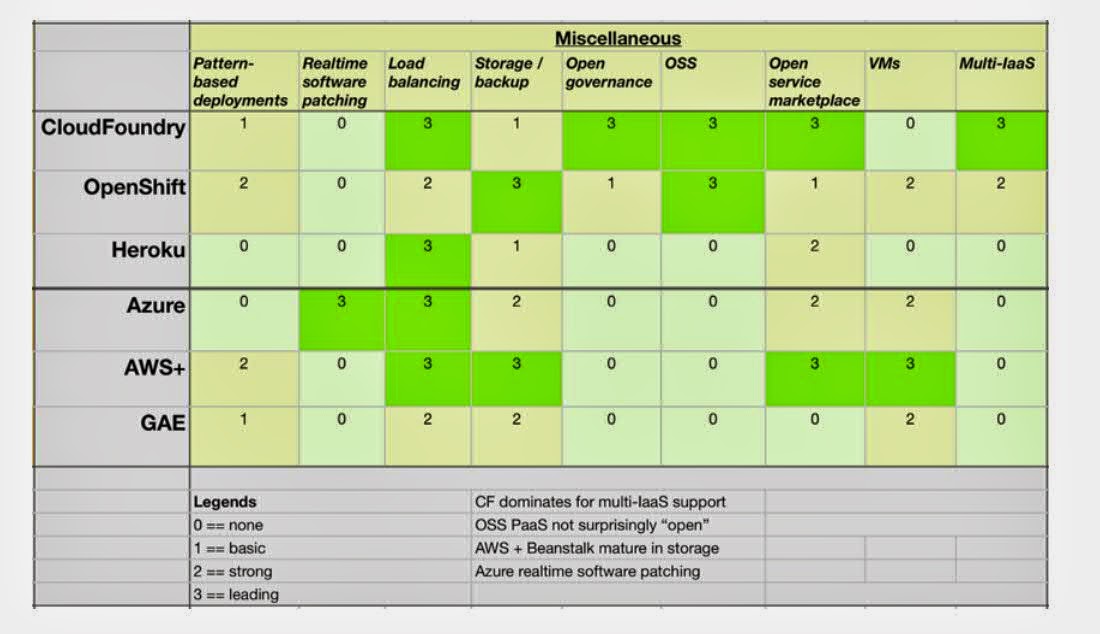
Recently I saw a ppt about Paas comparison.It compares and contrasts leading PaaSes on multiple dimensions and feature sets to see where CF leads and lags.
If you want to prepare local development env for BlueMix,the below things you must need to know.
1.Download node.js from http://www.nodejs.org/download
2.Install Nodeclipse CLI and Express
3.Install the client: Enide Studio 2014
It is enough for Node.js, JavaScript and Java development Install in RSA4WS 9.0.0.1 using update site:
4.Install Git
5.Clone a Git repository in Enide Studio /RSA
a)Browse to your project page on DevOps Services.
b)Copy the Git URL from the right side of your project page.
As example – the git repository from Rainer https://hub.jazz.net/git/rhocheck/MemoryMatters
My git repository (forked from Rainers) https://hub.jazz.net/git/blackwhites/MemoryMattersKF
6)Connecting to your DevOps Services Project with EGit
In Eclipse, select File > Import. In the Import window, select Git > Projects from Git and click Next. Select Clone URI and click Next. Paste the copied Git URL in the URI field. Enter your Jazz.net User ID and IBM ID password in the Authentication section. Click Next. Select the branches that you want to work on and click Next. Update the Local Destination of the cloned repository if needed and click Next. Click Next and then Finish.
Notes:
you can use “connect” to more git repositories
Heroku is a cloud platform as a service (PaaS) supporting several programming languages. Heroku was acquired by Salesforce.com in 2010.It is one of the first cloud platforms, has been in development since June 2007, when it supported only the Ruby programming language, but has since added support forJava, Node.js, Scala, Clojure, Python and PHP and (undocumented) Perl. The base operating system is Debian or, in the newest stack, the Debian-basedUbuntu.
Today I will compare Heroku and BlueMix these two PAAS features.I list some comparison results below just for your reference.
1 Command line tool They use different command line
Heroku: Heroku toolbelt (CLI tool for creating and managing Heroku apps)
e.g. $ heroku login
$ heroku create
$ heroku logs 2.Application deployment
Bluemix: by Cloud Foundry command line: cf push
Heroku: by git push. Better git integration
3.Application check
BlueMix N/A
Heroku: Run Production Check
run a series of tests on your app recommended for maintaining and monitoring availability. Each check includes useful links to related resources.
4.UI responsiveness
BlueMix Support mobile,PAD see below screenshot
Heroku Not well support
5.Build in Service
BlueMix Support about 50 etc
Heroku more then 100 services provided
6.third-party-buildpacks
BlueMix less
Heroku third-party buildpacks available for use with your Heroku apps. These buildpacks enable you to use languages and frameworks beyond those officially supported by Heroku. You can see some detail feature comparison result from below screen.
If you are a bluemix newbie,I think the following provided workshop are best for you to learn BlueMix.I coolect some from internet,you can download and learn it by yourself.
Watson, IBM’s artificial intelligence computing platform, is changing the way we compute. From its roots as a robotic contestant on Jeopardy, the machine-learning marvel is now being positioned as a tool for doctors, business people, and scientists worldwide--one that can answer any question posed to it in natural English.
Watson represents the first wave of a new era of computing in which cognitive systems think, improve by learning and turn massive amounts of data into insights to help businesses make better decisions.
What I learn Waston is serveral year ago ,IBM's Watson supercomputer destroys all humans in Jeopardy.You can see the cool video about that competition.
IBM Watson Engagement Advisor is a solution to transform the way people and organizations interact over the lifetime of their relationships
So what can I do waston on BlueMix?
There is an article about the Waston bluemix solution on the developerworks.
Today I listen to a session about "Advanced Features for the Applications in Bluemix" from product team,some new features are added on the BlueMix.I will share some new features here.
RMU(Runtime Management Utility )
The below scenario I think most developer will meet on BlueMix.
As the application operator, I hope to generate dump files for running application in bluemix.
As the application operator, I hope to update the logger level dynamically to the running application in bluemix.
The RMU will provide the above feature to easy for you to debug the issue on the BlueMix.Let us see how it work.
a)Suppose you use "Liberty for Java" to create a Java application.When you click the Liberty for java,you can see the instance details.
b)You can choose "trace" or "dump" feature.
c.You can set the log level for the trace.
d0Also you can create dump file and download it.
Auto Scaling
Auto-Scaling, as indicated by the name, helps you to manage your application capacity automatically on target environment.You can see below artichure,
Metrics
CPU
Memory
Heap memory
Policy
Trigger (Threshold, statistic window)
minimum instance number
maxmum instance number
Scaling adjustment
Scaling adjustment type(percentage or number)
Let;s see how it work on the BlueMix.
You can bind this add-on to your application.
2.Click the DashBoard on the BlueMix.You can see which application used sceal add on.
3.Click the edit button,you can change the default policy for this application.You can define the rules to increase the instance based on the real needs.
4.You can also check the metric like CPU,memory used for this application.It will better help you to make the decision for the auto-scale.
A quick way to learn BlueMix ,you can leran some demo projects.GitHub a good place to share your project,code ,blog etc to public.Today I will introduce ten BlueMix projects from GitHub.Hope it will help you learn more about BlueMix.
Twitter Influencer Analyzer is a web application which collects data from Twitter, Klout and Google Maps to display influence relationships between twitter users.
This is a Node.js app that uses the following cloud services:
Cloudant NoSQL DB
This is a NodeJS app that uses the following cloud services:
MySQL Database
This app demonstrates how to connect to a MySQL database on codename: BlueMix from a NodeJS app. Simply upload a line-separated file of text (e.g. tweets), and it will add each line to MySQL.
Wordpress work on the IBM BlueMix Platform.A step by step guide how to deploy wordpress to BlueMix
4.Building a real-time polls application with Node.js, AngularJS and MongoDB
https://github.com/joelennon/bluemixpolls
This application allows you to create polls - and enables users to vote on polls, with the results updating in real-time. The app accompanies the IBM developerWorks article Building a real-time application with Node.js, AngularJS and MongoDB.
The app uses the following libraries and frameworks:
his is a Java app that uses the following cloud services:
Cloudant
6. Blog application on BlueMix
https://github.com/glynnbird/bluemix_blog
This is a demo application to test out Node.js, Cloudant and BlueMix.

It is a simple blogging application with the data being stored in a Cloudant database. When a blog post is published, it is:

* stored in Clouding
* sent to the MQlight message queue
* each server picks up the item from the message queue and broadcasts it to all connected clients via Websockets
Use the IBM Bluemix Location services and Instagram to find pictures near an address. It's written in Node.js and uses the following Bluemix services:
Pitney Bowes Geocoding service
8.BlueMix Job candicate search
https://github.com/IBM-Bluemix/bluemix-hr-outreach A node.js project to use Linked API to find candicate on the Linkedin 9.BlueMix Cloud Photo Album https://github.com/dittyQu/CloudPhotoAlbum A java application to show how to upload photo on the BlueMix 10.db2welcome-bluemix https://github.com/data-henrik/db2welcome-bluemixThe code shows how to combine DB2 and Python on IBM Bluemix (http://bluemix.net). It requires either a free trial or a regular account and the creation of a SQL DB (DB2) service. The tables (schema.sql) are created using the administration interface, then the data loaded.
I think most of people played a game named fishermen on Andriod or IOS device.I think we can do a html version on BlueMix.I have deployed it on the http://fisherman.mybluemix.net/,you can play it online.
Actually it is a very simple html js project ,I think you can do it yourself.
1.First download the game source code,you can get it from http://pan.baidu.com/s/1i3IHkK9
2.Unzip the code to your disk for example c:\finsherman
3.use cf command to deploy the code.Use cf command to login.
C:\Users\IBM_ADMIN>cf login API endpoint: https://api.ng.bluemix.net
Username>XXXXs@gmail.com
Password> Authenticating... OK
4.Since the site is static sites,we will use nginx-buildpack to deploy our application.
On
the open source software developed cloud platform
Actually I don;t use all these cloud service in China. But I can share my thoughts of using some of these.
1.JAE (http://jae.jd.com/_) is based on the CloudFoundry,it is still of free charge.It support java,python,nodejs,php etc language.Support MySQL、MariaDB、Mongo DB.
2.BAE (http://developer.baidu.com/cloud/rt)It supports the Node.js,PHP,Python,Java,Static etc language or framework.The latested version is BAE3. It is charged by the usage.
3.Ali Cloud,It is not based on the Cloudy plartform.,More like combine the PASS and IAAS.
One
was in July 2013, Alibaba completed a three year plan of “de-IOE”, in other
words, not using IBM minicomputers, Oracle Database and EMC storage. Alibaba
used computer cluster of low cost PC to build supercomputer, which was the first
Chinese internet enterprise to fulfill “de-IOE”. In October 2013, Alibaba
finished its 5K plan independently, with a single cluster servers of 5000
computers to complete 100 TB sorting in merely 30 mins. It beat Yahoo’s record
in July 2013 of 71 mins. Ali Cloud became the first enterprise to offer 5K cloud
computing service.
In future I think Ali Cloud will be a strong cloud competitor in Chinese market since it aims more domestic company.
BlueMix based on the cloud foundry has made major advancements since being announced . BlueMix Helps Build and Integrate Apps Quickly IBM's new BlueMix
services are designed to help businesses rapidly transform using Big Data, mobile and social technologies in the cloud. Some of the new
BlueMix services include: Cloud Integration services to securely connect and integrate an
organization's applications and information in the cloud. Developers can use
pre-defined connectors for accelerated integration, or develop custom APIs as
needed to easily and securely tie back into systems of record behind their
firewall. Integrated API management capabilities provide an easy mechanism to
publish self-service APIs, that can be shared with the broader API economy. This
allows developers to mix cloud-based PaaS, third party cloud applications, and
on-premises systems behind security gateways, moving between cloud and
on-premises systems in a hybrid, integrated environment. Internet of Things services allowing developers to register and
connect networked devices such as microprocessors and embedded machine to
machine sensors to the cloud, easily aggregating and reacting to data and events
in real time. Organizations can build applications which efficiently manage,
analyze, visualize, and interact with the massive quantities of temporal and
spatial data generated by vehicles, wearables, mobile phones, cameras,
computers, sensors and other intelligent devices. Data and Analytics services for developers to deliver data-centric
mobile, web-scale applications. With these new services, including geospatial,
time series, predictive scoring, and reporting, developers can easily create
sophisticated applications that provide real-time actionable insight so that
organizations can predict outcomes and make better business decisions. For
example, a developer could create an application that integrates sensor data,
location data, weather data and usage trends from a network of equipment to
identify and avoid emerging maintenance issues. In addition, new data masking,
discovery and audit capabilities help developers create applications with
built-in data privacy and security. DevOps services enabling developers, IT departments and business teams
with an open, integrated rapid development environment that scales from
individual developers to enterprise teams. The DevOps Continuous Integration
service will provide end-to-end "build" capabilities to speed changes through
the development process, DevOps Mobile Quality Assurance (MQA) will help analyze
user sentiment to spot problems before they go viral, and the Monitoring and
Analytics service will identify application problems during development -
leveraging analytics to help applications achieve availability and performance
goals. In addition, DevOps will include a new RapidApp service that requires no
coding, using visual tools to expand the scope of web and business applications
developers can create
What is the relationship among of them? Today I will take about this.
Git is a free and open source
distributed version control system designed to handle everything from small to
very large projects with speed and efficiency.
GitHub is online project hosting using Git. Includes source-code browser, in-line editing, wikis, and ticketing.Pls don;t confuse these two concept of these two words.
You have 2 ways to work with your JazzHub project sourced in Git
Git command tool from git: http://git-scm.com/downloads
EGit Eclipse client eclipse.org: http://www.eclipse.org/downloads/
Notes:When you install git command tools for windows ,you need to choose to use git from window command promot mode.
After you install the git,you need to do some command after installation git config --global user.name "XXXX" git config --global user.email XXXX@gmail.com git config --global core.editor notepad.exe
You can use git config --list to list all the configuration of git.
IBM DevOps Services(Old Name JazzHub) is a place where you can collaborate with others to develop, track, plan and deploy software.Lets see how we fork a jazzHub project and get project use git.
First I will fork one project in JazzHub,
https://hub.jazz.net/project/arzetry/nodeJS-bluemix/overview
Click the edit code button and it will go to the web edit mode,I click the fork link to one of my project.
You can use get the git url when you click the Git URL link for this project.
We can use the git client tool to get the code on your local side.
Since manifest.yml recored the bluemix deployment info,we need to change the previous domain and host.The changes like below.
Use the below command to submit the changes
git commit -m "change deploy conf"
Push the changes to the jazzhub.
c:\nodeJS>git push origin master Username for 'https://hub.jazz.net':XXXXX@XXX.com Password for 'https://XXXX@XXX@hub.jazz.net': Counting objects: 6, done. Delta compression using up to 4 threads. Compressing objects: 100% (3/3), done. Writing objects: 100% (3/3), 318 bytes | 0 bytes/s, done. Total 3 (delta 2), reused 0 (delta 0) remote: Resolving deltas: 100% (2/2) remote: Processing changes: refs: 1, done To https://hub.jazz.net/git/blackwhites/nodeJS d47f709..14800f3 master -> master
Open the manifest.yml again in the jazzhub,you can see the content is already changed.
After you change the code in WEB-UI,you need to commit the changes on the git.
If you don;t have git client tools you can directly edit the file on the jazzhub web UI.Everytimes when you finish the changes,you need to request a deploy, after that you can see the deployment status.
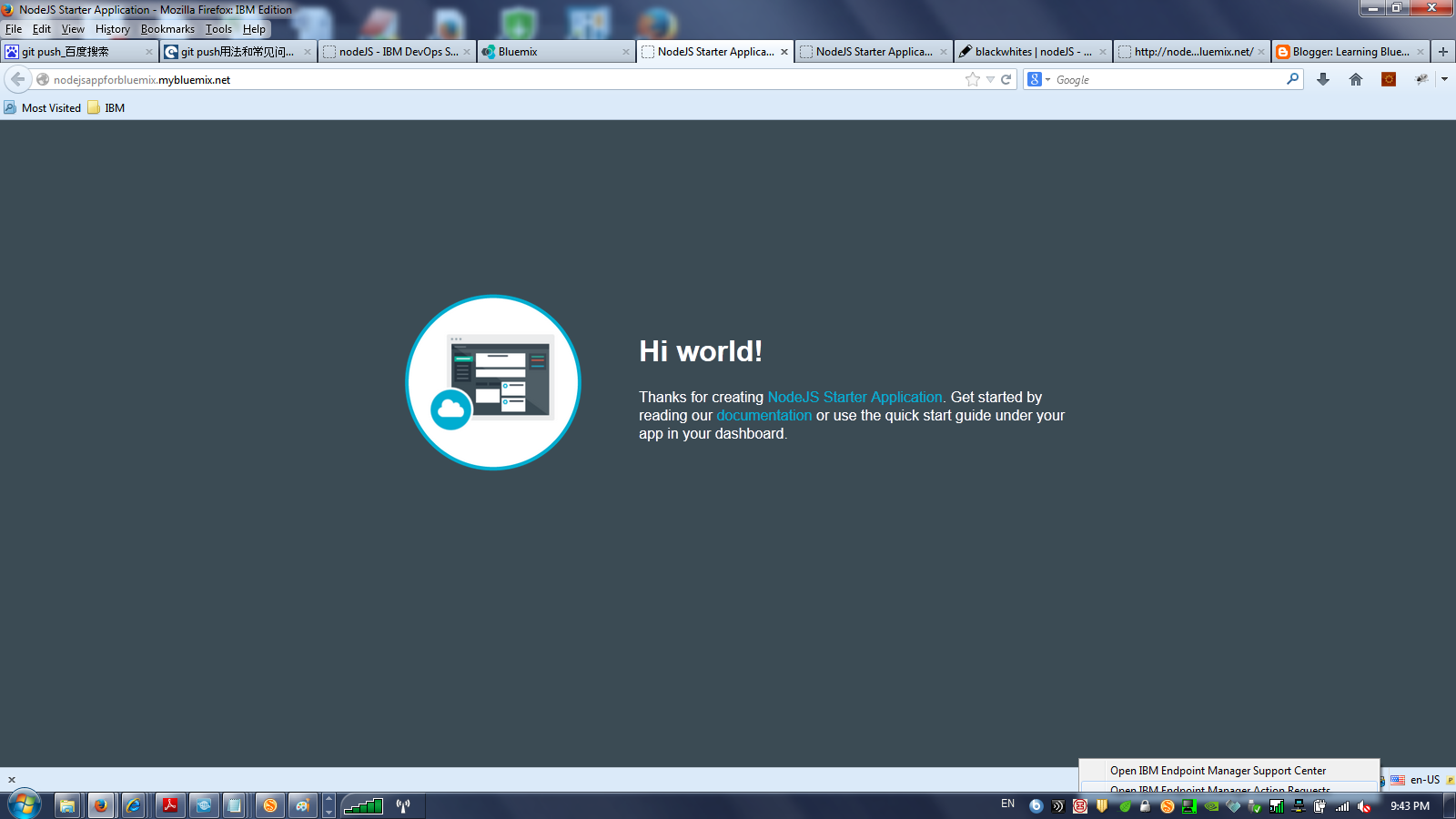
I go the bluemix category site,I can directly see the application has already been deployed and also been integrated with GIT.Lets see the application how it look like.
Congulation, you have a basic learn how git,jazzhub,bluemix work together to build a strong collaboration platform to deploy your application.
Recently I noticed that on BlueMix it provide a very cool feature RapidApp.With RapidApps, business developers can design applications for web
browsers, tablets, or mobile devices through a graphical user interface.
You never have to work with any code or scripts to create a
professional application.
Today I will show a simple demo for that.
1.First you need to create a RapidApps service for that leave Apps unbound.
2.After created service you can double click this service it will open the RapidApps console,it might take a while to finish the loading.
3.Enter the console,choose your user and organization,you can begin to create your apps.In the demo I created a application name 'Where is my car?" and input the description about my app.
4.After created your apps you can see the project dashboard ,you can do some operation on this app
5.Click the data plus link to create a Locations object and add the below attributes for this object.
6.Create your app screen,in our demo we need to create two screen one is called Main Menu and another is called Saved Location menu,
7.Drag a Text object onto the screen and change the text to describe your application. Double-click the text to edit it,also add two button save location and list location on the screen,
8.create another screen Saved Locations.When user click the main screen button save button,it will jump to the saved Locations screen.
9.Drag a form control on the saved locations with data object "location".
In order to automatically to assign the value for the driver ,you need to select Driver control and set the Driver Property to USER_ID.This value is when you login into BlueMix you user id.
9.Now, we can activate the button on the main menu. Select the Main Menu screen. Right-click the Save Location button and select Properties.Set “On click, navigate to” to Save Location
10.To test any screen, you can preview it. On the right-hand side, there is an eyeball icon – click on it To see a preview of your screen.Notice in the Mobile Browser Simulator menu, you can add multiple devices to see what your application will look like on various form factors.
You can choose andrio or ios device to simulate your apps.
So through this demo you might have a good understanding how easy to use rapidapps to design your app prototype.