Tuesday, August 19, 2014

Use RapidApps to create your mobile protype on BlueMix

Recently I noticed that on BlueMix it provide a very cool feature RapidApp.With RapidApps, business developers can design applications for web browsers, tablets, or mobile devices through a graphical user interface. You never have to work with any code or scripts to create a professional application.

Today I will show a simple demo for that.
1.First you need to create a RapidApps service for that leave Apps unbound.
2.After created service you can double click this service it will open the RapidApps console,it might take a while to finish the loading.
3.Enter the console,choose your user and organization,you can begin to create your apps.In the demo I created a application name 'Where is my car?" and input the description about my app.
  4.After created your apps you can see the project dashboard ,you can do some operation on this app
5.Click the data plus link to create a Locations object and add the below attributes for this object.


6.Create your app screen,in our demo we need to create two screen one is called Main Menu and another is called Saved Location menu,
7.Drag a Text object onto the screen and change the text to describe your application. Double-click the text to edit it,also add two button save location and list location on the screen,
8.create another screen Saved Locations.When user click the main screen button save button,it will jump to the saved Locations screen.
9.Drag a form control on the saved locations with data object "location".
In order to automatically to assign the value for the driver ,you need to select Driver control and set the Driver Property to USER_ID.This value is when you login into BlueMix you user id.


9.Now, we can activate the button on the main menu. Select the Main Menu screen. Right-click the Save Location button and select Properties.Set “On click, navigate to” to Save Location

10.To test any screen, you can preview it. On the right-hand side, there is an eyeball icon – click on it
To see a preview of your screen.Notice in the Mobile Browser Simulator menu, you can add multiple devices to see what your application will look like on various form factors.

You can choose andrio or ios device to simulate your apps.
So through this demo you might have a good understanding how easy to use rapidapps to design your app prototype.

Sunday, August 17, 2014

Customize Build Packs for BlueMix

This blog I most will record my learning bluemix experience,I hope my blog will also improve your skills about BlueMix.

If you can't find a starter in the IBM® Bluemix™ catalog that provides the runtime that you want, you can bring an existing buildpack to Bluemix. You can specify a custom, Cloud Foundry-compatible buildpack when you deploy your application by using the cf push command. 


For Bluemix side ,you can use cf  buildpackes command to list all buildpacks they suupported.


If you want to use custmize buildpack for Bluemix, there are several articles you can reference that.I list some links for your reference.So you may use go,php,python,Nginx  buildpack to write your application.

Use a custom Go buildpack with IBM Bluemix
Diving Into PHP and BlueMix
Create a static web site on IBM Bluemix
sing-db2-with-python-on-cloud-foundry

Thursday, August 14, 2014

Cloud app design pattern

Sometimes we use BlueMix we will find some services is not stable, you might not be clear to know these service's status.it is necessary to know the service working status.You can visit the
http://estado.ng.bluemix.net/,it will report all the service status.


When we design the app on the cloud ,we must think about the best pattern and best practices for developing modern applications for cloud platforms.

The twelve-factor app is a methodology for building software-as-a-service apps that:
  • Use declarative formats for setup automation, to minimize time and cost for new developers joining the project;
  • Have a clean contract with the underlying operating system, offering maximum portability between execution environments;
  • Are suitable for deployment on modern cloud platforms, obviating the need for servers and systems administration;
  • Minimize divergence between development and production, enabling continuous deployment for maximum agility;
  • And can scale up without significant changes to tooling, architecture, or development practices.
The twelve-factor methodology can be applied to apps written in any programming language, and which use any combination of backing services (database, queue, memory cache, etc).The detail content you can visit http://12factor.net/

I. Codebase
One codebase tracked in revision control, many deploys
II. Dependencies
Explicitly declare and isolate dependencies
III. Config
Store config in the environment
IV. Backing Services
Treat backing services as attached resources
V. Build, release, run
Strictly separate build and run stages
VI. Processes
Execute the app as one or more stateless processes
VII. Port binding
Export services via port binding
VIII. Concurrency
Scale out via the process model
IX. Disposability
Maximize robustness with fast startup and graceful shutdown
X. Dev/prod parity
Keep development, staging, and production as similar as possible
XI. Logs
Treat logs as event streams
XII. Admin processes
Run admin/management tasks as one-off processes

Tuesday, August 12, 2014

How to make your application more security on BlueMix

Sometimes people want to make sure their application has no security issue on the cloud.Is there any service support that? The answer is yes,IBM provide a AppScan Dynamic Analyzer service which help you to scan your application on BlueMix and give you scan report,so you can change your code based on the suggestion they provide.

1.for your existing created liberty java project on the BlueMix,you only need to add this service into it.You can find this service through security category.
2.Double click the appscan dynamic analyzer service .add this service to your application.
 3.After created this service for the specified application,you can double click this service.

4.Add your bluemix application url as the scan site.
5.After scan 5-10 minutes,you can see the report has generated.You can download the action part pdf to see the detail action and sugestion.

Monday, August 11, 2014

My Experience of using Enbeddable report on BlueMix

IBM has provide the Embeddable report service on BlueMix platform,how it look like? Today I will write my experience of using this.

Based on the official document,the current report service is still in beta version.It lets you run IBM Cognos Business Intelligence reports within your Bluemix environment. The reporting service is based on Cognos BI and supports content that was authored using Cognos BI Dynamic Query mode. The service runs against supported JDBC data source connections with applications that use one of our supported Bluemix runtime environments. You can use the provided REST-based interface to run reports and easily integrate reporting into your applications.

So let us experience for that. You can get the sample from the below link.
https://www.ng.bluemix.net/docs/#services/EmbeddableReporting/index.html#gettingstartedtemplate
The demostrate sample you can download form the below link.
https://erservice-beta1.ng.bluemix.net/public/sample-1.0.zip.

Some key steps for the sample.
1.Create a java liberty application on BlueMix.Here I named reportsample as the application name.
2.Create there services to bind this application.See below image.
a)MongoDB
The Embeddable Reporting service supports MongoDB as the repository for all reporting artifacts, which include:
  • Report specifications
  • Data source connections
  • (Optional) IBM Cognos Business Intelligence C10 model
b)SQLDB
It keeps the data which you will use this data to render your report based on this data.
c)Embeddable Reporting
It populate the MongoDB repository with your report artifacts from the service console that is associated to your instance of IBM Embeddable Reporting for Bluemix
 3. Unzip the sample,zip you can see below strcture
4.Click the SQLDB service console,upload the branch.csv,products.csv,sales.csv under data folder into the sqldb table.Pls use load data feature to upload you csv to create the db data and table in sqldb service.
5.Pls record the db credntial information for reporting service configuration.You can click
Show Credentials link to check these kinds of info.

For mongo db


{
  "mongolab": {
    "name": "MongoLab-2v",
    "label": "mongolab",
    "plan": "sandbox",
    "credentials": {
      "uri": "mongodb://XXXXXXX.mongolab.com:35257/IbmCloud_2g1be8as_1raue6of"
    }
  }
}

For sql db

{
  "sqldb": {
    "name": "SQL Database-hq",
    "label": "sqldb",
    "plan": "sqldb_small",
    "credentials": {
      "port": 50000,
      "db": "I_992247",
      "username": "XXXXXX",
      "host": "23.246.233.41",
      "hostname": "23.246.233.41",
      "jdbcurl": "jdbc:db2://XXXXXXXXXX:50000/I_992247",
      "uri": "db2://XXXXXXX:XXXXXX@23.246.233.41:50000/I_992247",
      "password": "XXXXXX"
    }
  }
}
6.Launch the Embeddable Reporting service,first you need to connect the mongdb use step 5
mongodb uri list in step five.
 
 
7.After connect,you need to import your report model on that.
8.Update the sqldb credential info based on step 5 and update the value in the provide
 screenshot.
9. Using the cf utility, log in to the Bluemix environment.
 
 Usage: cf login -a https://api.ng.bluemix.net -o <Bluemix ID>
When prompted, enter your email address and password.

The next step push report app on the BlueMix.

cf push reportsample -p  defaultServer
 
10.Launch the report web application through the url.
 

Monday, August 4, 2014

How BlueMix integrated with JazzHub?

There are some new video about BlueMix released on the YouTube.You can learn key aspects of IBM BlueMix strategic technologies.
Rachel Reinitz, Distinguished Engineer and CTO for IBM Bluemix Garage, has three new videos about Bluemix:
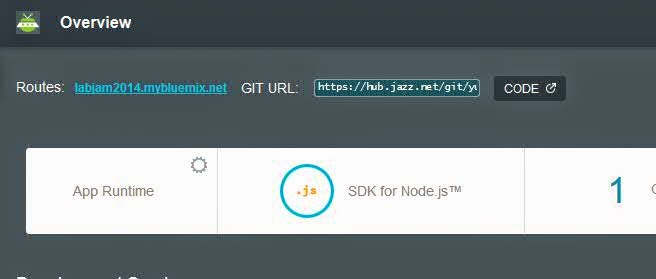
BlueMix can full use of Jazz hub feature to manage and deploy your code . I made node.js project as sample .

1.First create node.js project from BlueMix
2.After create the project,you can see a add git button.
3.When click the add git button,it will let you input your jazzhub IBM id.

4.It will prompt you to create git Repository.
5.You will see the Success info.
6.You can see the application page,the page has already integrated with GIT.
7.Click the code button,you can enter the project code edit mode.
8.You can use configure button to change the deploy parameter for the BlueMix.

Sunday, August 3, 2014

IBM Cloud self-test questions

Today I just passed company internal CAMSS activity.It include some questions about cloud,social,mobile,big data,security,analyse six area.Since I am more interested in the Cloud part,So I post cloud part questions,if you can test your cloud knowledge here.It is totally seven questions.

What is IBM's prescriptive approach for architecting cloud solutions?

Select an answer
 A.  Service Oriented Architecture (SOA)
 B.  Client-Server Architecture
 C.  Cloud Computing Reference Architecture (CCRA)
 D.  ITIL Architecture


Systems of Engagement incorporate technologies that encourage peer interactions and often leverage cloud technologies. Two technologies that encourage peer interactions are:

Select an answer 
 A.  Databases and message systems.
 B.  Mobile and social.
 C.  ERP and CRM applications.
 D.  None of the above.

When designing a cloud solution, some technical details that should be considered are:

Select an answer
 A.  Level of virtualization.
 B.  Public, private, or hybrid solution.
 C.  Computer storage and networking requirements.
 D.  All of the above.
In addition to compute, storage, and networking, what other capabilities are important elements of IaaS?

Select an answer
 A.  Automation and management (example would be SmartCloud Orchestrator)
 B.  Web application servers and databases (example would be WebSphere and DB2)
 C.  Application Development and Management tools (example would be BlueMix)
 D.  Analytics (example would be Cognos)


BlueMix enables developers to rapidly build, deploy, and manage cloud applications, while tapping a growing ecosystem of available services and runtime frameworks. BlueMix is based on which open standards?

Select an answer A
 A.  Cloud Foundry
 B.  Open Stack
 C.  Open Group
 D.  OASIS
Which of the following is the first question you should explore with a client?
Select an answer
 A.  What platforms are in your data center (x, p, z)?
 B.  What business needs are you trying to solve?
 C.  What level of virtualization do you have in your data center?
 D.  Do you need a public or private cloud solution?

Cloud is evolving from being IT-centric to being value-centric. Which three key architectural elements best support this value-centric viewpoint?
Select an answer
 A.  Software Defined Enviroment, Cloud Operating Environment, API Economy
 B.  Virtualization, Optimization, Infrastructure Management
 C.  Multi-Tenancy, Multi-Site Topography, Auto-Scaling
 D.  Open Cloud Standards, Management APIs, Rapid Deployment Options

I don;t directly provide my answer here.You can comment the answer if you are interested in .